Service
Dynamics 365 penetration testing for the configuration you own
Dynamics 365 penetration testing focuses on how your organisation configured the platform. So it covers security roles, data access, integrations and any customer-facing portal.
- Signed written scope first
- Senior ethical hackers only
- Your NDA signed as standard
Why Dynamics 365 penetration testing matters
Microsoft secures the platform itself. However, your security roles, business units and integrations decide who sees customer and financial data. Therefore most real exposure sits in configuration.
Growth adds risk quietly. For example, a role cloned for one project keeps wide access years later.
What Dynamics 365 penetration testing examines
The test follows data from record to report. Also, it checks what an ordinary user can reach beyond their job.
- Security roles, teams and business units
- Dataverse table and field access
- Power Platform connectors and flows
- Customer portals built on the platform
- Integrations with other systems
Dynamics 365 penetration testing readiness check
Tick what is already true. Open items become part of the written scope.
Your result appears here as you tick, so you can see what is still open.
Rules for Dynamics 365 penetration testing
Microsoft publishes rules of engagement for testing its cloud services. So testing targets your tenant and stays within those rules, never the shared platform.
| Rule | What it means |
|---|---|
| Your tenant only | No testing of other customers or Microsoft systems |
| Written authorisation | Signed scope before any activity |
| No denial of service | Availability is never tested |
| Test accounts | Agreed roles created for the test |
What you receive
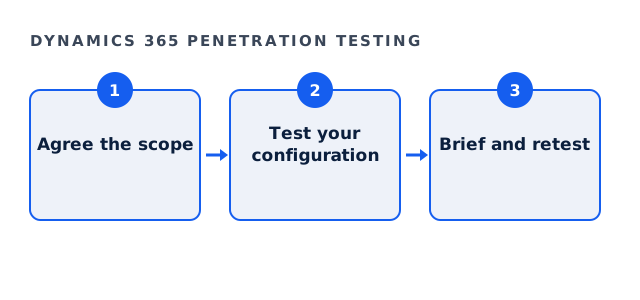
A senior ethical hacker briefs you personally on findings, impact and fixes. Also, a retest confirms what you closed. The rules are in the Microsoft Cloud penetration testing rules of engagement.
Nothing is retained afterwards. In addition, your NDA is signed before any technical discussion.
Fees
Full engagements usually land between $35,000 and $120,000, with a floor of $25,000. The bounded External Exposure Review starts at $4,500, and its fee is credited in full against a full engagement commissioned within ninety days.
Also review roles after each project. Because new apps bring new tables, old roles may gain access by accident. So a short role review after major releases keeps access close to need. In addition, check who can create flows, since automation can move data quietly.
Dynamics 365 penetration testing questions
Does Microsoft allow Dynamics 365 penetration testing?
Yes, of your own tenant, within its published rules of engagement.
Does Dynamics 365 penetration testing cover Power Platform?
Connectors and flows linked to your environment can be included in scope.
Can Dynamics 365 penetration testing run in a sandbox?
Yes, and a sandbox copy is often the safest choice.
Do you test Microsoft's own systems?
No. Only the configuration you own.
Related guides
Scope your Dynamics 365 penetration testing
Tell us which apps and portals you run. We reply with a written scope and a fixed fee, and nothing starts before you sign.
Request a written scope